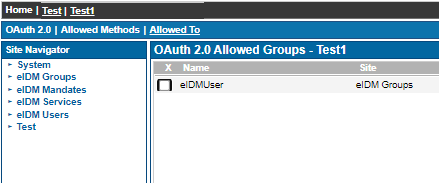
This configuration example has been tested by using Ubisecure SSO 8.8.1 and Suomi.fi in February 2022.
Ubisecure Identity Platform can be configured to use external Identity Providers for user authentication. The prerequisite is that the Identity Provider implements one of the protocols supported by Ubisecure Identity Platform, typically SAML2 or OpenID Connect. For the list of all supported protocols, please refer to Authentication methods - SSO.
Suomi.fi e-identification service is used by Finnish public sector organizations for strong user authentication. This article describes how Suomi.fi can be configured as an Identity Provider for Ubisecure Identity Platform by using SAML2 protocol. For the description of the Suomi.fi SAML2 interface, please refer to the Technical interface description.
Identity Providers are configured as authentication methods for Ubisecure Identity Platform. You can create authentication methods in Management user interface - SSO or by using Management API - SSO. In this article, we configure the authentication method in the Management UI. For examples on Management API usage, please refer to Use the Ubisecure SSO Management API with curl.
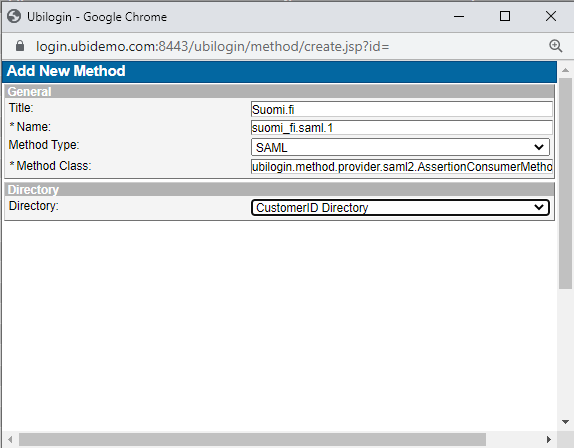
1. Create an authentication method for example with name suomi_fi.saml.1 and title Suomi.fi as follows:
Go to the tab Global Method Settings and click on New Method. Enter the title and name, and select SAML for the method type. If you are planning to link the Suomi.fi identity to your local user store, choose CustomerID Directory or other user directory based on your environment. The directory can also be left unspecified now and set later if needed.
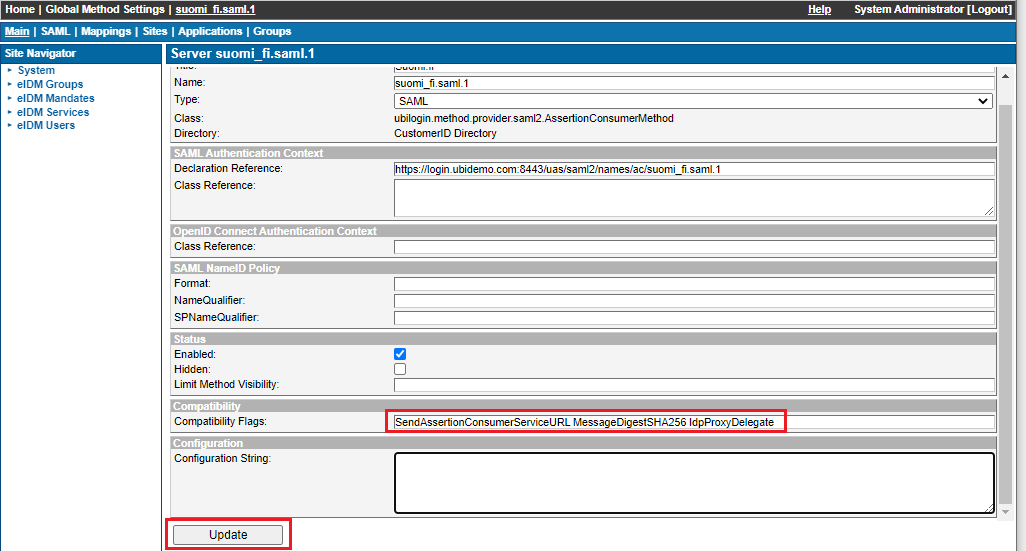
2. Enable the method and add the following SAML Compatibility Flags, and click on Update:
MessageDigestSHA256 IdpProxyDelegate SendAssertionConsumerServiceURL
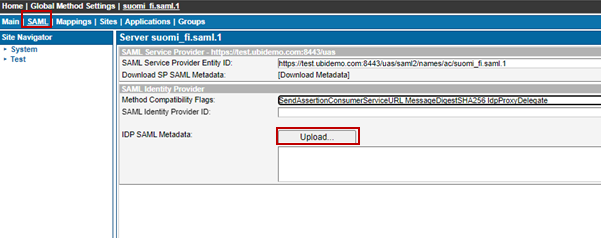
3. On the SAML tab, upload Suomi.fi Identity Provider metadata. Please check the Suomi.fi documentation for the correct metadata. At the time of writing, the metadata is available at the following addresses:
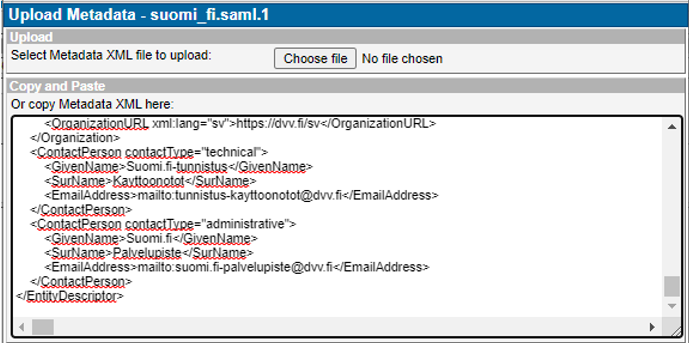
You can either save the metadata to a file and upload it to Ubisecure SSO with the Choose file button, or choose view source from your browser tools and directly copy-paste the metadata to the Ubisecure SSO dialogue.
Download example metadata and edit fields marked as TODO based on information on your service and your contact details.
Define desired assurance levels, eIDAS authentication and user attributes based on your business needs, please refer to Suomi.fi metadata description.
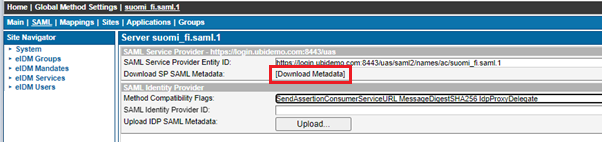
Download SAML Service Provider metadata from your Ubisecure SSO authentication method and copy the following fields (marked as red in the example metadata below) to your Suomi.fi Service Provider metadata:
- entityID
- X509Certificate
- AssertionConsumerService for HTTP-POST binding
- SingleLogoutService for HTTP-POST and HTTP-Redirect bindings
As a result, you should have your Suomi.fi Service Provider metadata file like the example below. In Suomi.fi Service Management, create a new e-service and upload your metadata. Monitor the state of your e-service until it is in the state "Published". This may take several days.
<?xml version="1.0"?>
<md:EntityDescriptor xmlns:md="urn:oasis:names:tc:SAML:2.0:metadata" entityID="https://test.ubidemo.com:8443/uas/saml2/names/ac/suomi_fi.saml.1">
  <md:Extensions xmlns:alg="urn:oasis:names:tc:SAML:metadata:algsupport">
    <mdattr:EntityAttributes xmlns:mdattr="urn:oasis:names:tc:SAML:metadata:attribute">
      <saml:Attribute xmlns:saml="urn:oasis:names:tc:SAML:2.0:assertion" Name="FinnishAuthMethod" NameFormat="urn:oasis:names:tc:SAML:2.0:attrname-format:uri">
 	      <saml:AttributeValue xmlns:xs="http://www.w3.org/2001/XMLSchema" xmlns:xsi="http://www.w3.org/2001/XMLSchema-instance" xsi:type="xs:string">http://ftn.ficora.fi/2017/loa3</saml:AttributeValue>
        <saml:AttributeValue xmlns:xs="http://www.w3.org/2001/XMLSchema" xmlns:xsi="http://www.w3.org/2001/XMLSchema-instance" xsi:type="xs:string">http://eidas.europa.eu/LoA/high</saml:AttributeValue>
 	      <saml:AttributeValue xmlns:xs="http://www.w3.org/2001/XMLSchema" xmlns:xsi="http://www.w3.org/2001/XMLSchema-instance" xsi:type="xs:string">http://ftn.ficora.fi/2017/loa2</saml:AttributeValue>
 	      <saml:AttributeValue xmlns:xs="http://www.w3.org/2001/XMLSchema" xmlns:xsi="http://www.w3.org/2001/XMLSchema-instance" xsi:type="xs:string">http://eidas.europa.eu/LoA/substantial</saml:AttributeValue>
        <saml:AttributeValue xmlns:xs="http://www.w3.org/2001/XMLSchema" xmlns:xsi="http://www.w3.org/2001/XMLSchema-instance" xsi:type="xs:string">urn:oid:1.2.246.517.3002.110.999</saml:AttributeValue>
      </saml:Attribute>
      <saml:Attribute xmlns:saml="urn:oasis:names:tc:SAML:2.0:assertion" FriendlyName="VtjVerificationRequired" Name="urn:oid:1.2.246.517.3003.111.3" NameFormat="urn:oasis:names:tc:SAML:2.0:attrname-format:uri">
        <saml:AttributeValue xmlns:xs="http://www.w3.org/2001/XMLSchema" xmlns:xsi="http://www.w3.org/2001/XMLSchema-instance" xsi:type="xs:string">true</saml:AttributeValue>
      </saml:Attribute>
      <saml:Attribute xmlns:saml="urn:oasis:names:tc:SAML:2.0:assertion" FriendlyName="SkipEndpointValidationWhenSigned" Name="urn:oid:1.2.246.517.3003.111.4" NameFormat="urn:oasis:names:tc:SAML:2.0:attrname-format:uri">
        <saml:AttributeValue xmlns:xs="http://www.w3.org/2001/XMLSchema" xmlns:xsi="http://www.w3.org/2001/XMLSchema-instance" xsi:type="xs:string">false</saml:AttributeValue>
      </saml:Attribute>
      <saml:Attribute xmlns:saml="urn:oasis:names:tc:SAML:2.0:assertion" FriendlyName="EidasSupport" Name="urn:oid:1.2.246.517.3003.111.14" NameFormat="urn:oasis:names:tc:SAML:2.0:attrname-format:uri">
        <saml:AttributeValue xmlns:xs="http://www.w3.org/2001/XMLSchema" xmlns:xsi="http://www.w3.org/2001/XMLSchema-instance" xsi:type="xs:string">full</saml:AttributeValue>
      </saml:Attribute>

      <saml:Attribute xmlns:saml="urn:oasis:names:tc:SAML:2.0:assertion" FriendlyName="CipherName" Name="urn:oid:1.2.246.517.3003.111.26" NameFormat="urn:oasis:names:tc:SAML:2.0:attrname-format:uri">
        <saml:AttributeValue xmlns:xs="http://www.w3.org/2001/XMLSchema" xmlns:xsi="http://www.w3.org/2001/XMLSchema-instance" xsi:type="xs:string">AES-GCM</saml:AttributeValue>
      </saml:Attribute>
    </mdattr:EntityAttributes>
  </md:Extensions>
  <md:SPSSODescriptor AuthnRequestsSigned="true" WantAssertionsSigned="true" protocolSupportEnumeration="urn:oasis:names:tc:SAML:2.0:protocol">
    <md:Extensions>
      <mdui:UIInfo xmlns:mdui="urn:oasis:names:tc:SAML:metadata:ui">
        <mdui:DisplayName xml:lang="fi">Ubisecure Test</mdui:DisplayName>
        <mdui:DisplayName xml:lang="sv">Ubisecure Test</mdui:DisplayName>
        <mdui:DisplayName xml:lang="en">Ubisecure Test</mdui:DisplayName>
        <mdui:Logo height="54" width="327">https://test.ubidemo.com:8443/uas/template/default/logo</mdui:Logo>
        <mdui:Description xml:lang="fi">Ubisecure Test</mdui:Description>
        <mdui:Description xml:lang="sv">Ubisecure Test</mdui:Description>
        <mdui:Description xml:lang="en">Ubisecure Test</mdui:Description>
        <mdui:PrivacyStatementURL xml:lang="fi">https://test.ubidemo.com:8443/rekisteriseloste_fi.html</mdui:PrivacyStatementURL>
        <mdui:PrivacyStatementURL xml:lang="sv">https://test.ubidemo.com:8443/rekisteriseloste_sv.html</mdui:PrivacyStatementURL>
        <mdui:PrivacyStatementURL xml:lang="en">https://test.ubidemo.com:8443/rekisteriseloste_en.html</mdui:PrivacyStatementURL>
      </mdui:UIInfo>
    </md:Extensions>
    <md:KeyDescriptor>
      <ds:KeyInfo xmlns:ds="http://www.w3.org/2000/09/xmldsig#">
        <ds:X509Data>
          <ds:X509Certificate>
		  MIIHnTCCBoWgAwIBAgIMBmNjg/2tuTbD+KDAMA0GCSqGSIb3DQEBCwUAMFAxCzAJBgNVBAYTAkJF
MRkwFwYDVQQKExBHbG9iYWxTaWduIG52LXNhMSYwJAYDVQQDEx1HbG9iYWxTaWduIFJTQSBPViBT
U0wgQ0EgMjAxODAeFw0yMjAyMDMwODI2MTVaFw0yMzAzMDcwODI2MTVaMHMxCzAJBgNVBAYTAkZJ
MRAwDgYDVQQIEwdVdXNpbWFhMQ4wDAYDVQQHEwVFc3BvbzETMBEGA1UECxMKT3BlcmF0aW9uczEV
MBMGA1UEChMMVWJpc2VjdXJlIE95MRYwFAYDVQQDDA0qLnViaWRlbW8uY29tMIICIjANBgkqhkiG
9w0BAQEFAAOCAg8AMIICCgKCAgEAu4lZI2W7nV+n9+nkeoucx8YYSuOO4tODgMw3Mfllveix6pBu
JJkJJMDRogINn2Cn0Rw6844pBrG6tUTrWB03x1DyBzpHqduP1cR298eSF+7xoARhLoWGzgy7lqOe
gvdyc4dXaioAlt6pBUkIdzrrhktgVLG3arWgFRsyjiDF4yvai2VRzxYuOhyvmrv6At6WbaNcJq+5
EPxot0+RN6/VGgnObMTHiEhg1o2iXjWzAjxaGBNuh5GEoAOgxHARQREfq78QojKtq7b3OQSBFXJg
SDlTyEiMs+0N9MJH/6Fpq3o+64ePl8v2Hf1uOdIDWDwcIx+bNm0McC71i8G6fCn3asQV0d5QIz/b
H1LXi1XWMEEnfwYwSKLliJETCJrgPl+kNm9/uz6siA/nnFrJYexPJLr8RLh8Coap4CZYyPuBrJk3
ekSXtFncKGhUsY4YgU/VKo02QkbV+y5ltm8LaIiCawKfB79e3nO4IHAPVffbG+WTz7JJIDWqCuN8
jTfGSKjCqU9s2sHef5V712ysUAR8NuYQep/ex2kCZGt0nBw78TAJ9seouY8XQpKYzPZes7WPXw4a
+Dr6Ej41fQSfEMJUHmWOMUxKI/BCoUsb2WxU1Xbv2M2zSDQXCKQOQpyA2/ewUrbwC4v3pB1tNZTW
HSDTLSTP7TbzP8ccd4ae4ct9CekCAwEAAaOCA1IwggNOMA4GA1UdDwEB/wQEAwIFoDCBjgYIKwYB
BQUHAQEEgYEwfzBEBggrBgEFBQcwAoY4aHR0cDovL3NlY3VyZS5nbG9iYWxzaWduLmNvbS9jYWNl
cnQvZ3Nyc2FvdnNzbGNhMjAxOC5jcnQwNwYIKwYBBQUHMAGGK2h0dHA6Ly9vY3NwLmdsb2JhbHNp
Z24uY29tL2dzcnNhb3Zzc2xjYTIwMTgwVgYDVR0gBE8wTTBBBgkrBgEEAaAyARQwNDAyBggrBgEF
BQcCARYmaHR0cHM6Ly93d3cuZ2xvYmFsc2lnbi5jb20vcmVwb3NpdG9yeS8wCAYGZ4EMAQICMAkG
A1UdEwQCMAAwPwYDVR0fBDgwNjA0oDKgMIYuaHR0cDovL2NybC5nbG9iYWxzaWduLmNvbS9nc3Jz
YW92c3NsY2EyMDE4LmNybDAlBgNVHREEHjAcgg0qLnViaWRlbW8uY29tggt1YmlkZW1vLmNvbTAd
BgNVHSUEFjAUBggrBgEFBQcDAQYIKwYBBQUHAwIwHwYDVR0jBBgwFoAU+O9/8s14Z6jeb48kjYjx
hwMCs+swHQYDVR0OBBYEFOoiDjiGobrioozdoI2NkZnXflTrMIIBfwYKKwYBBAHWeQIEAgSCAW8E
ggFrAWkAdgDoPtDaPvUGNTLnVyi8iWvJA9PL0RFr7Otp4Xd9bQa9bgAAAX6+sPtMAAAEAwBHMEUC
IBISPF2k1kkRILApfCW5rbiuJzBG0KInxqhouHsyFbgHAiEApg10SLnj6xNZATR8zHUf6OM2Qr8D
hTjyOxQJNt9fhBUAdgBvU3asMfAxGdiZAKRRFf93FRwR2QLBACkGjbIImjfZEwAAAX6+sPtOAAAE
AwBHMEUCIQDczHnsanb03ik4B4DWPu8efaRN/JD3nvUi90XWk/O4hgIgaGP1L2k3vc7TIP+PtKQU
ZROfLVDRJxWQ3rFn6Rh6b7wAdwBVgdTCFpA2AUrqC5tXPFPwwOQ4eHAlCBcvo6odBxPTDAAAAX6+
sPttAAAEAwBIMEYCIQCIepINaSPffzvimtXxfeYohSvwwd6qkKI3Dxe0FJlwSgIhAONaLHvheGx2
T7nbF+BwHoizg6LkZTKsYDG4exXRX9PDMA0GCSqGSIb3DQEBCwUAA4IBAQAJQxwIXR7sOthtHXyl
o6SrOeYA3fuspLjGE82a+m9kjK4IuD00ZC5Ffzgs3hH7PUXihfhS/hqujhRipCQ9PkmtR/RWnp5M
AWHd7QRxUCyRutQVCB+CpTfWeIekB64XeF+ynL+9EhQu3aW++sB4hHgNsarymqZCstWtMn93WxGY
z97HSoI1r7LpcP9a6wPV5wX+YHCvWdTXU6x4pTI0A71T/fCcMC87sXaj/UR1CFOP+y5kzbFazgGW
e554d2tuOTuf54T3H/BXsHg24zGAtWqYALCwXQrb1r9zoH2mp0iO+N3uFM6F/2bRTJf2FHeQR2OH
WKv+OiNF+qfnq5R1g20w</ds:X509Certificate>
        </ds:X509Data>
      </ds:KeyInfo>
    </md:KeyDescriptor>
    <md:SingleLogoutService Binding="urn:oasis:names:tc:SAML:2.0:bindings:HTTP-Redirect" Location="https://test.ubidemo.com:8443/uas/logout/suomi_fi.saml.1"/>
    <md:SingleLogoutService Binding="urn:oasis:names:tc:SAML:2.0:bindings:HTTP-POST" Location="https://test.ubidemo.com:8443/uas/logout/suomi_fi.saml.1"/>
    <md:NameIDFormat>urn:oasis:names:tc:SAML:2.0:nameid-format:transient</md:NameIDFormat>
    <md:AssertionConsumerService Binding="urn:oasis:names:tc:SAML:2.0:bindings:HTTP-POST" Location="https://test.ubidemo.com:8443/uas/return/suomi_fi.saml.1/AssertionConsumerService" index="1" isDefault="true"/>
    <md:AttributeConsumingService index="1" isDefault="true">
      <md:ServiceName xml:lang="fi">Ubisecure Test</md:ServiceName>
      <md:ServiceName xml:lang="sv">Ubisecure Test</md:ServiceName>
      <md:ServiceName xml:lang="en">Ubisecure Test</md:ServiceName>
      <md:RequestedAttribute FriendlyName="kid" Name="urn:oid:1.2.246.517.3003.113.4" NameFormat="urn:oasis:names:tc:SAML:2.0:attrname-format:uri"/>
      <md:RequestedAttribute FriendlyName="FirstName" Name="http://eidas.europa.eu/attributes/naturalperson/CurrentGivenName" NameFormat="urn:oasis:names:tc:SAML:2.0:attrname-format:uri"/>
      <md:RequestedAttribute FriendlyName="nationalIdentificationNumber" Name="urn:oid:1.2.246.21" NameFormat="urn:oasis:names:tc:SAML:2.0:attrname-format:uri"/>
      <md:RequestedAttribute FriendlyName="displayName" Name="urn:oid:2.16.840.1.113730.3.1.241" NameFormat="urn:oasis:names:tc:SAML:2.0:attrname-format:uri"/>
      <md:RequestedAttribute FriendlyName="cn" Name="urn:oid:2.5.4.3" NameFormat="urn:oasis:names:tc:SAML:2.0:attrname-format:uri"/>
      <md:RequestedAttribute FriendlyName="sn" Name="urn:oid:2.5.4.4" NameFormat="urn:oasis:names:tc:SAML:2.0:attrname-format:uri"/>
      <md:RequestedAttribute FriendlyName="givenName" Name="urn:oid:2.5.4.42" NameFormat="urn:oasis:names:tc:SAML:2.0:attrname-format:uri"/>
      <md:RequestedAttribute FriendlyName="FamilyName" Name="http://eidas.europa.eu/attributes/naturalperson/CurrentFamilyName" NameFormat="urn:oasis:names:tc:SAML:2.0:attrname-format:uri"/>
      <md:RequestedAttribute FriendlyName="DateOfBirth" Name="http://eidas.europa.eu/attributes/naturalperson/DateOfBirth" NameFormat="urn:oasis:names:tc:SAML:2.0:attrname-format:uri"/>
      <md:RequestedAttribute FriendlyName="PersonIdentifier" Name="http://eidas.europa.eu/attributes/naturalperson/PersonIdentifier" NameFormat="urn:oasis:names:tc:SAML:2.0:attrname-format:uri"/>
    </md:AttributeConsumingService>
  </md:SPSSODescriptor>
  <md:Organization>
    <md:OrganizationName xml:lang="fi">Ubisecure</md:OrganizationName>
    <md:OrganizationName xml:lang="sv">Ubisecure</md:OrganizationName>
    <md:OrganizationName xml:lang="en">Ubisecure</md:OrganizationName>
    <md:OrganizationDisplayName xml:lang="fi">Ubisecure</md:OrganizationDisplayName>
    <md:OrganizationDisplayName xml:lang="sv">Ubisecure</md:OrganizationDisplayName>
    <md:OrganizationDisplayName xml:lang="en">Ubisecure</md:OrganizationDisplayName>
    <md:OrganizationURL xml:lang="fi">https://www.ubisecure.com</md:OrganizationURL>
    <md:OrganizationURL xml:lang="sv">https://www.ubisecure.com</md:OrganizationURL>
    <md:OrganizationURL xml:lang="en">https://www.ubisecure.com</md:OrganizationURL>
  </md:Organization>
  <md:ContactPerson contactType="technical">
    <md:GivenName>Technical</md:GivenName>
    <md:SurName>Contact</md:SurName>
    <md:EmailAddress>mailto:support@ubisecure.com</md:EmailAddress>
  </md:ContactPerson>
</md:EntityDescriptor>
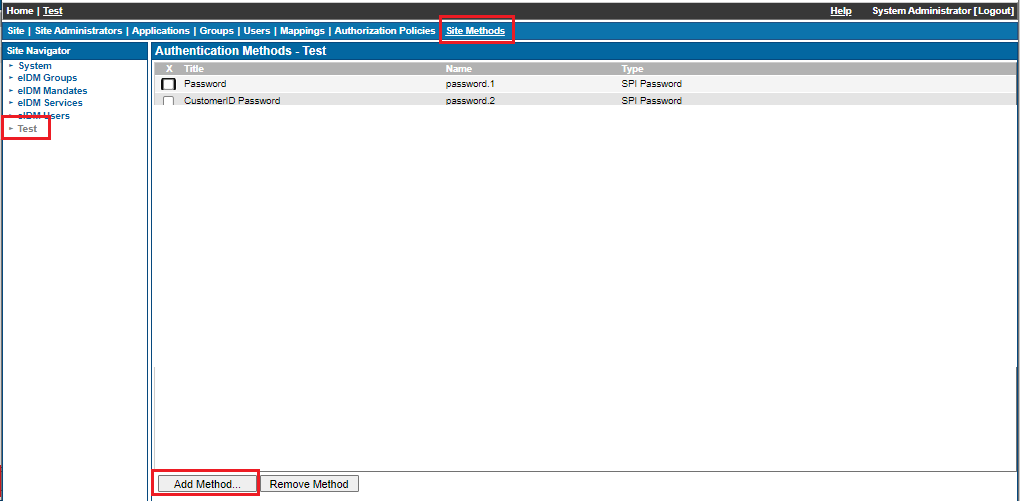
In order to configure Suomi.fi authentication for your applications and services, a group is typically used. Create a group, for example Suomi.fi users as follows:
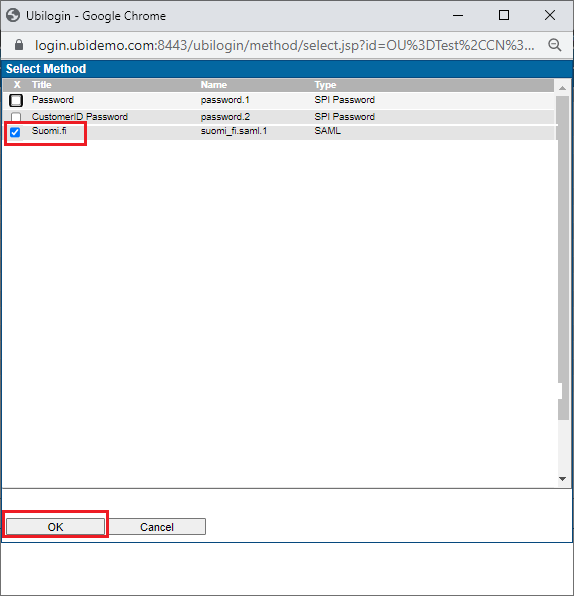
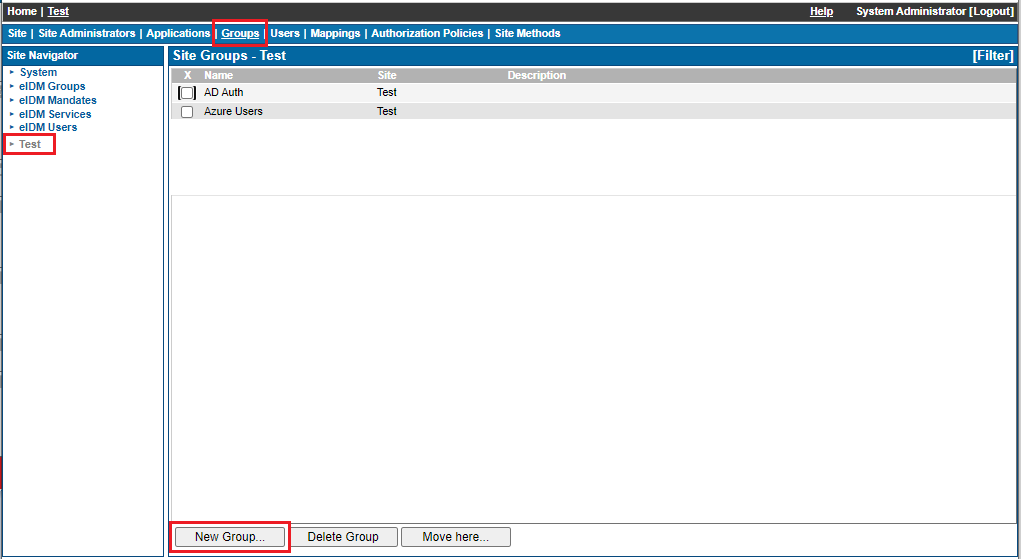
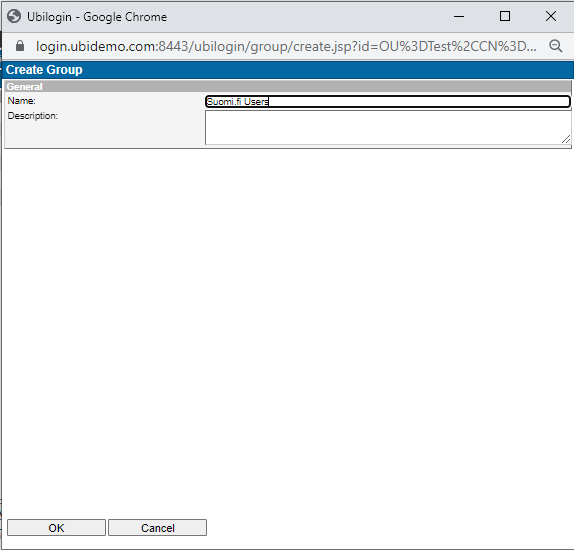
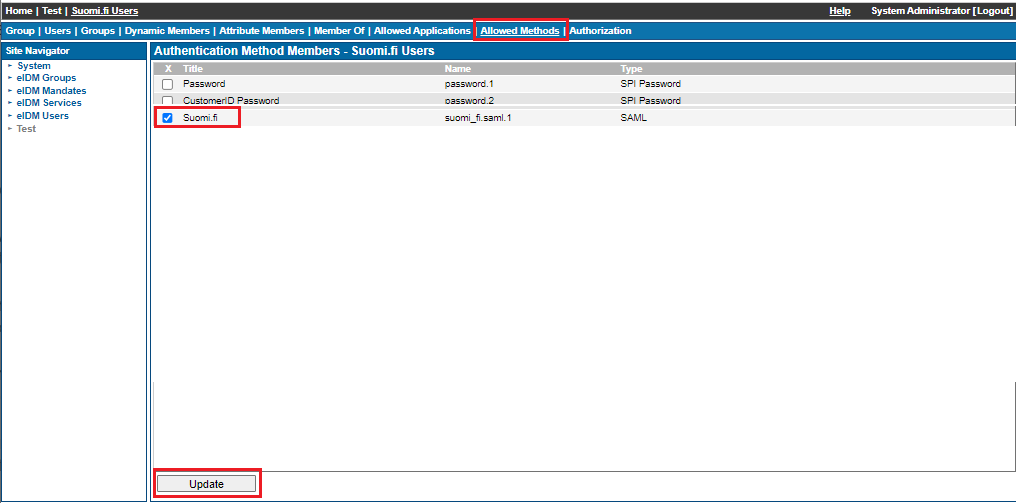
Now all users authenticating via Suomi.fi get Suomi.fi users group membership and it can be used in Authorization Policies for access configurations.
There are 2 typical use cases for Suomi.fi authentication:
- Identity verification for creating user accounts
- Strong authentication when signing in to services
For identity verification, please refer to Protected CustomerID workflows for an example configuration.
For configuring Suomi.fi authentication for your applications, you have the following options:
- Allow access to any user successfully authenticated via Suomi.fi
- Locate a local user account by using the Social Security Number received from Suomi.fi and allow access based on your Authorization Policy settings
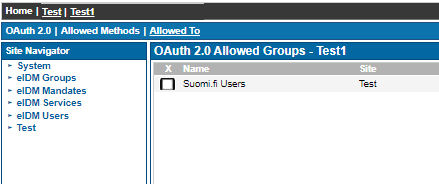
For allowing access to all Suomi.fi authenticated users, simply allow access for the Suomi.fi users group:
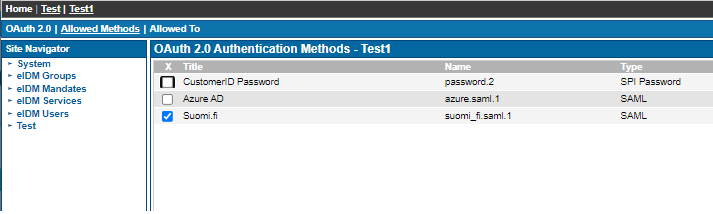
For mapping a Suomi.fi identity to a local user account, use Directory User Mapping with the following LDAP filter:
(&(objectclass=ubiloginUser)(description={method:urn:oid:1.2.246.21}))
Then allow access to the mapped identities, typically CustomerID users: